
Screenshots
App details
- Version
- 1.0
- Size
- 168.30 KB
- Updated
- March 28, 2022
- Requires
- Windows 7
- Language
- English
- License
- Free
- Developer
- Visit Website
- Category
- Windows OS
SoftPas in:
This product is also available in the following languages:
About Readability
Download Readability – Clean Reading, Distraction‑Free Browsing, Firefox Extension
Overview
In a world where endless streams of information compete for our attention, the ability to focus on the actual content of an article is a rare luxury. Readability is a free Firefox extension designed specifically to strip away the visual clutter that surrounds long‑form web pages, turning a noisy, advertisement‑laden site into a clean, newspaper‑style reading experience. Once installed, Readability adds a small “R” icon to the lower‑right corner of the browser toolbar. Clicking the icon instantly transforms the current page into a minimalist view where the text is re‑flowed, margins are optimized, and the background is softened for reduced eye strain. The extension works best with lengthy blog posts, news articles, and e‑books that would otherwise force you to scroll through unrelated sidebars, pop‑ups, and tracking scripts. Although the visual theme is limited to a set of predefined styles—such as “Newspaper”, “Novel”, and “eBook”—the core promise remains the same: delivering a distraction‑free, comfortable reading environment. For anyone who spends a substantial amount of time consuming written content online, Readability offers a simple, secure, and highly effective way to improve comprehension and reduce fatigue.
Key Features of Readability
- Clutter Removal: Automatically hides ads, navigation bars, and side panels, presenting only the main article text.
- Predefined Themes: Choose from newspaper, novel, ebook, and other visual presets to match your reading preference.
- Adjustable Font Size & Margin Width: Fine‑tune the text size and page margins without leaving the article view.
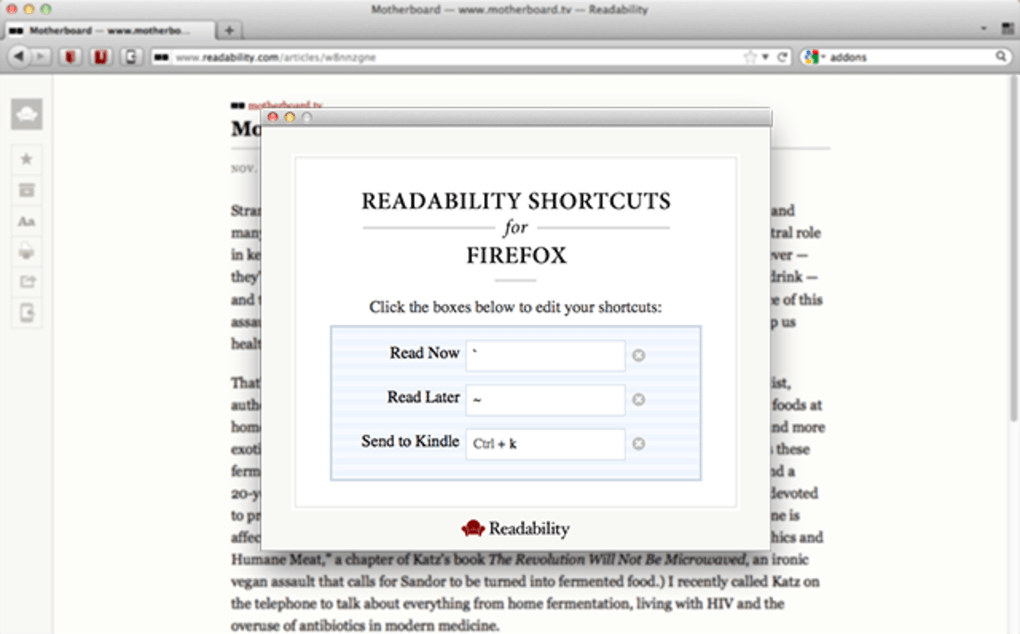
- Keyboard Shortcuts: Activate Readability with Alt + Ctrl + R; enable auto‑scroll with Ctrl + Shift + A, both fully customizable.
- Instant Toggle: One‑click or one‑shortcut conversion; revert to the original page layout instantly.
- Lightweight & Fast: Minimal resource usage ensures that the extension does not slow down page loading or browsing performance.
- Secure Updates: Automatic, signed updates from Mozilla’s add‑on store keep the tool safe and compatible with the latest Firefox releases.
Installation, Setup & Daily Usage
Getting started with Readability is intentionally straightforward. Begin by opening the Mozilla Add‑ons website, searching for “Readability”, and clicking the Add to Firefox button. After a brief permission review—confirming that the extension will only read and modify page content—the installation completes in seconds. Once installed, the tiny “R” icon appears in the bottom‑right corner of the browser window. Clicking this icon opens a compact settings panel where you can select your preferred theme, adjust the default font size, and set the margin width. While the themes are predefined, the size and spacing controls give enough flexibility for most readers.
For power users, the default keyboard shortcuts provide rapid access: press Alt + Ctrl + R to toggle the clean view, and Ctrl + Shift + A to enable automatic scrolling, which smoothly advances the page at a configurable speed. Both shortcuts can be re‑mapped via the extension’s options page, allowing you to align them with your existing workflow or ergonomic preferences.
Once activated, Readability rewrites the page in real time, stripping out extraneous HTML elements and re‑formatting the remaining text into a single column. The reading view is responsive, meaning it adapts gracefully to different window sizes and high‑DPI displays. To exit the mode, simply press the same shortcut again or click the “R” icon once more. Because the changes are applied only to the current tab, your original browsing session remains untouched, preserving bookmarks, history, and form data.
Compatibility, System Requirements & Updates
Readability is built exclusively for the Firefox ecosystem, supporting all major desktop platforms that run the browser—Windows 10/11, macOS 10.14+ (Mojave and later), and popular Linux distributions. The extension relies on Firefox’s WebExtensions API, which ensures consistent behavior across versions. While there is no native Android or iOS version, Firefox for Android can run the same add‑on through its “Add‑ons” manager, albeit with a slightly altered UI due to mobile constraints. Minimum system requirements are modest: a processor capable of running Firefox at a stable 60 fps, at least 2 GB of RAM, and an internet connection for downloading updates.
Updates are delivered automatically via Mozilla’s add‑on marketplace. Each release is signed and vetted by Mozilla’s security team, guaranteeing that the code remains free from malware or privacy‑invasive practices. Users receive a notification badge in the add‑ons manager when a new version is available, and can choose to apply it instantly or schedule it for the next browser restart. The development team follows a regular release cadence—approximately every 4–6 weeks— focusing on compatibility fixes for the latest Firefox releases, performance optimizations, and occasional theme additions. Because the extension does not collect personal data, it aligns well with privacy‑focused users who demand a secure, ad‑free reading environment.
Pros, Cons and Frequently Asked Questions
Pros
- Eliminates visual noise, making long articles easier to digest.
- Lightweight and fast; does not noticeably impact browser performance.
- Customizable keyboard shortcuts for rapid toggling.
- Secure automatic updates through Mozilla’s verified add‑on store.
- Works seamlessly on Windows, macOS, and Linux desktops.
Cons
- Limited to predefined visual themes; no full color or font‑family customization.
- No dedicated mobile app; Android support is constrained by Firefox’s mobile UI.
- Cannot save the cleaned‑up version of an article for offline reading.
- Relies on Firefox; not available for Chrome, Edge, or Safari.
FAQ
Can I use Readability on Chrome or Edge?
Readability is currently built only for Firefox using the WebExtensions API. A Chrome version has not been released, so users of Chrome or Edge will need to look for alternative extensions with similar functionality.
Does Readability store any of my browsing data?
No. The extension only reads the page content to reformat it and does not transmit any data to external servers. All processing happens locally within your browser.
How do I change the default keyboard shortcuts?
Open the Readability settings by clicking the “R” icon, then select “Keyboard Shortcuts”. From there you can assign new key combinations for both the toggle and auto‑scroll functions.
Is there a way to export a cleaned article for later reading?
Readability does not include a built‑in export feature. However, you can use the browser’s “Print to PDF” option while in reading mode to save a static copy of the article.
Will Readability affect my ad‑blocking extensions?
Readability works independently of ad‑blockers. In most cases it will complement them by removing additional layout elements, but there is no conflict that disables either tool.
Conclusion – Should You Download Readability?
If you spend a significant portion of your day scrolling through long blog posts, news stories, or online tutorials, Readability offers a free, secure, and lightweight solution that instantly transforms cluttered pages into a pleasant reading canvas. While the lack of full theme customization might be a drawback for power users, the core functionality—removing ads, sidebars, and other distractions—delivers a noticeable boost in focus and comfort. The seamless integration with Firefox, automatic updates, and intuitive keyboard shortcuts make it an indispensable tool for anyone who values a clean, distraction‑free browsing experience. Download Readability today and rediscover the joy of reading on the web without the visual noise.
Guides & Tutorials
How to install Readability
- Click the Download button above.
- Once redirected, accept the terms and click Install.
- Wait for the Readability download to finish on your device.
How to use Readability
This software is primarily used for its core features described above. Open the app after installation to explore its capabilities.
User Reviews
No reviews yet. Be the first to share your experience.
You may also like
more
Llama 2
Free-to-use large language model As the new addition to Meta’s arsenal of langua...

NotebookLM
Revolutionizing the note-taking and idea-generation process NotebookLM is an exp...

Github co pilot
AI-inspired software development and coding platform GitHub Copilot is a browser...

Google Gemma
Google’s lightweight AI models Introducing Google Gemma , a family of cutting-ed...

AI Image Enlarger
A free app for Windows, by ai-image-larger. AI Image Enlarger is a free software...

DALL E
AI-driven text-to-image transformation engine DALL·E is a free graphic and desig...